Configure OpenVPN on Asus router
Install the VPN directly on your Asus router : every device on the network is protected at once, including those without a VPN client (Smart TV, consoles, media boxes).
VPN on the router
Two solid reasons to put the VPN on your home router instead of installing it on each device.
Whole-network protection
A single setup protects every device on the network. No need to install a VPN client on each one.
For devices with no VPN client
Smart TVs, consoles, media boxes, Chromecast… these have no native VPN client. Routed through the router, they all use the encrypted tunnel.
Most consumer routers don't support VPN out of the box — you'd have to install third-party firmware (DD-WRT, TomatoUSB) through a flashing procedure that usually voids the warranty.
Good news : high-end Asus routers running ASUSWRT firmware natively support OpenVPN in both client and server mode — no flashing needed.
Compatible models (non-exhaustive) : RT-N66U, RT-AC56U, RT-AC66U, RT-AC68U, RT-AC68P, RT-AC87U, RT-AC3200, RT-AC88U, RT-AC3100, RT-AC5300.
Set up the OpenVPN client
-
1
Download our OpenVPN profiles
Grab the
.ovpnfiles from the monVPN client area. Keep them handy. -
2
Open the Asus admin panel
In your browser, type the router's IP —
192.168.1.1by default. Sign in, then open Advanced Settings → VPN → VPN Client.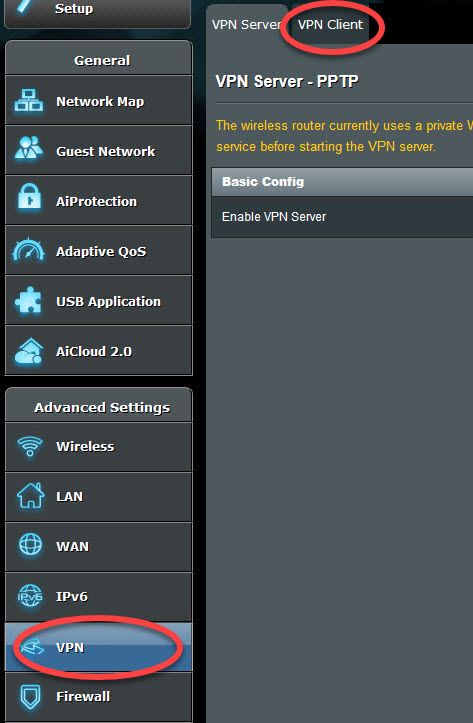
-
3
Add an OpenVPN profile
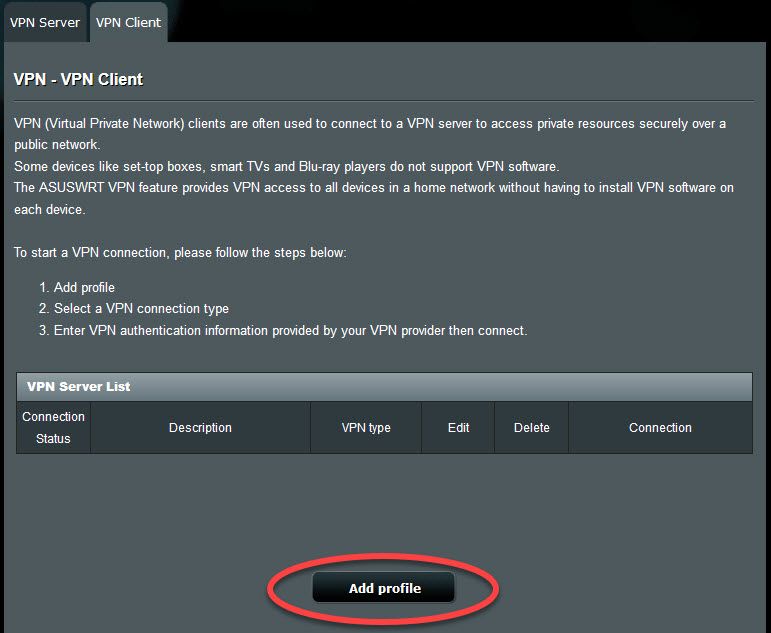
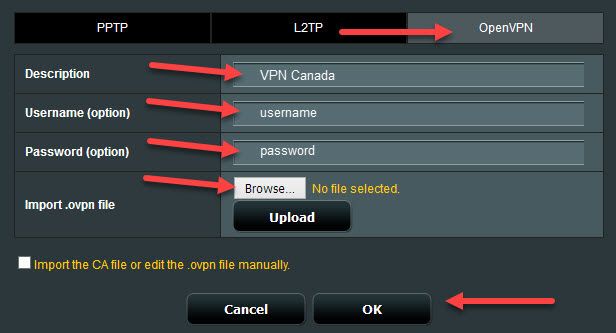
Click Add Profile, then :
- Pick the OpenVPN tab
- Choose a name / description
- Username : your VPN account name
- Password : your VPN password
- Browse : import the
.ovpnfile you downloaded - Click OK
Up to 6 VPN profiles can be saved in parallel.
-
4
Activate the connection
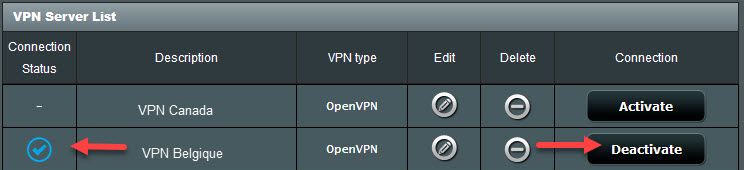
Click Activate / Deactivate next to the profile to bring the tunnel up. Every device on your network now goes through monVPN.